

On February 26, 2025, the US Department of Housing and Urban Development (HUD) terminated the Affirmatively Furthering Fair Housing (AFFH) rule. This decision included terminating the AFFH Data and Mapping Tool, which sought to inform policymakers, researchers, and the general public about federal housing decisions by “analyzing affordable housing, demographics, and measures of opportunity across localities and regions covering all US States, Washington DC, and Puerto Rico.”
Over the past three months, the Urban Institute’s data science team collaborated with the National Fair Housing Alliance (NFHA) to build a similar tool. We built our Fair Housing Data Mapping Tool as an R Shiny dashboard to visualize demographic and housing indicators across all states, counties, and census tracts. The core challenge of our rebuild was not having access to the existing code or previous versions of the HUD dashboard and operating under a tight 12-week timeline. To accelerate development, I incorporated an agentic programming tool, Claude Code (CC) with Opus 4.6.
This post is not about CC’s best practices, which is ground better covered by Anthropic’s comprehensive documentation and guides (PDF). Instead, it’s about the practical implications of CC as a tool for AI-assisted coding, applications where it excels, and its pitfalls. Ultimately, I find that CC, when steered effectively, offers an unprecedented acceleration in software development but does not change its fundamental principles.
Where Claude Code shines
Before reflecting more fully on CC’s utility, I want to be clear that our team could not have built the Fair Housing Data Mapping Tool in 12 weeks without CC’s assistance. CC reduced the time needed to write, refactor, document, debug, and test code by several orders of magnitude.
The productivity gain was clearest at framework boundaries as problems emerged from combining libraries that weren’t designed to work together. Two examples stood out.
- Cross-framework debugging
To increase the speed of data engineering operations, I defaulted to using data.table (dt), a high-performance version of base R’s data.frame (df) object, for all data transformation operations. Unfortunately, geospatial operations require simple features (sf), a formal standard for columns containing coordinates. While df would preserve these geometric attributes when interacting with sf, dt silently drops them..
This is an emergent behavior from combining two libraries (dt and sf) that weren’t designed to work together, and it isn’t mentioned in sf’s documentation as a result. Claude identified the root cause by reasoning through what dt operations do to R-object attributes. The solution was to always convert dt objects into data.frames before performing any sf conversions and operations, as shown below.
# data.table silently drops sf geometry attributes
dt <- data.table::as.data.table(counties_sf)
subset_dt <- dt[state_fips == "01"]
sf::st_bbox(subset_dt) # Error or stale bbox
# Fix: convert to data.frame before sf operations
subset_df <- as.data.frame(subset_dt)
subset_sf <- sf::st_as_sf(subset_df)
sf::st_bbox(subset_sf) # Correct bbox for Alabama only
This fix was discovered within five minutes with CC and would have taken me more than an hour to debug by myself.
- Easier experimentation and iteration
A Leaflet map in an R Shiny dashboard receives user interactions, zooms, pans, and clicks as reactive inputs. When any of these inputs change, Shiny invalidates the downstream observers or outputs dependent on them, triggering reexecution. With Leaflet, Shiny manages the server-side reactive chain while the map itself maintains its own internal rendering state (zoom level, loaded tiles, and so on) on the web browser with Leaflet.js. The two communicate through a JavaScript to R bridge. This boundary is where most of the complexity lives when you need behavior beyond what the Leaflet R package provides.
Under tight timelines, user interface and design polish is usually the first thing cut. Nice-to-haves, like an overlaid “loading” message, require coordinating CSS classes, JavaScript message handlers, and Shiny observers.
Equipped with only a rudimentary understanding of JavaScript, I relied on CC to translate conceptual requirements for the tool into working implementations with line-by-line explanations. This type of refinement made the tool more intuitive for NFHA’s stakeholders, and I couldn’t have done it without AI assistance. CC allowed me to go the extra mile when building the dashboard by lowering the barriers to entry for experimentation in areas outside my expertise.
Where Claude Code comes up short
Even with the benefits of working with CC given our timeline and documentation constraints, our team discovered clear shortcomings of CC during the build process.
- Lack of domain expertise
Domain expertise is a crucial component of research and policy-oriented development workflows, allowing developers to flag nuances and fix errors as they happen. During our build, we found the most pernicious bugs were those where incorrect values were successfully rendered. CC did not pick up on these errors, which would diminish the confidence of users with domain expertise.
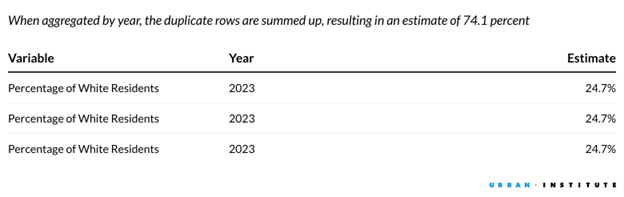
For example, tract-level bar charts initially displayed the “Percentage of White Residents (%)” metric at roughly 74.1 percent when the actual value was 24.7 percent. Although the cause was simple—duplicate rows were being summed—CC was only able to trace the source of error after I had identified it.
A subtler version of the same problem: The crosswalk mapping counties to states was built from a static dataset bundled with the tigris R package, while geometry files were downloaded live from the Census Bureau. When the Census Bureau retired FIPS (Federal Information Processing Series) codes—e.g., Shannon County, South Dakota (46113) became Oglala Lakota County (46102); Wade Hampton Census Area, Alaska became Kusilvak Census Area—the static dataset fell out of sync. The app worked perfectly for all states but specific county selections in South Dakota and Alaska produced errors. Standard CC testing with California or New York counties would never surface it.
Beyond spotting incorrect values, some decisions are subjective judgments that CC cannot make on a developer’s behalf. This is illustrated by Connecticut’s planning regions. The Census Bureau replaced Connecticut’s eight historical counties with nine planning regions in 2022. The planning regions have completely different boundaries and FIPS codes.
Deciding on which to visualize is inherently subjective. Sticking to planning regions aligns with current administrative definitions but is arguably less useful than counties, which are more relevant to policymakers. AI can implement either decision flawlessly, but it can't make the decision.
The same applied to visual design: Translating NFHA’s brand identity into CSS and theme settings required studying their existing tools and making aesthetic judgements at every step. Yet CC consistently defaulted to generic implementations. These design and branding decisions are not strictly technical, but as AI tools handle more of the implementation work, a data scientist’s eye for detail becomes more important.
- Existing constraints
Given enough tokens, Claude can generate code with zero friction. While this is powerful during prototyping, CC is still bound by existing technical constraints, which cause costs to accumulate rapidly. Under tight deadlines, I often prioritized implementing new features based on stakeholder input over refactoring existing code or creating unit tests. Two aspects of R Shiny made this particularly consequential.
The first is Shiny’s inconsistent approaches to user interface (UI) design. Base Shiny UI and modern UI toolkits such as bslib use a different set of functions to create front-end elements, while offering developers the flexibility to write custom HTML, JavaScript, and CSS. When deciding on the best way to add a feature, CC will borrow liberally from these approaches. Optimizing locally (solving the immediate element) rather than globally (maintaining consistency across the UI and reactive components) results in bloated implementations. The figure below illustrates how CC might implement the same UI element in three different ways:
# Card 1: bslib
bslib::card(
bslib::card_header("Total Organizations"),
bslib::card_body(textOutput("org_count"))
)
# Card 2: base Shiny
shiny::wellPanel(
h4("Total Revenue"),
textOutput("revenue_total")
)
# Card 3: raw HTML
tags$div(
class = "custom-card",
tags$h4("Average Assets"),
tags$div(class = "card-value", textOutput("avg_assets"))
)
The second is the lack of effective testing packages. Though unit testing with testthat can ensure functions work with edge cases, determining if reactive elements behave as expected is not straightforward. The existing shinytest2 toolkit has high set-up costs and isn’t exhaustive, making it rarely worthwhile, especially during shortened development cycles.
Together, frictionless development combined with these limitations meant CC produced a functional and aesthetically polished prototype that sacrificed maintainability, functional decomposition, and test coverage. Without a testing suite, refactoring code that close to the deadline carried a high risk of regression without adequate time for debugging.
This is not a new problem. Before AI, developers were vulnerable to the same oversight but were acutely aware of these risks because they wrote all the code. Additionally, the frictions inherent in writing code naturally induce reflection, allowing us time to think about hedging and making fixes reversible. This is significantly harder to do with CC. Ultimately, the behavioral changes under AI assistance necessitate that developers are as deliberate as possible when using these tools.
- Prompting can feel productive without being productive
The conversational rhythm of AI-assisted development—type a prompt, read a response, type another—creates a feeling of momentum. But momentum and progress aren’t the same thing. There were sessions where I went back and forth with Claude for 20 minutes on a rendering issue, making incremental adjustments to plotly trace configurations, before stepping back and realizing I hadn’t verified the input data. A simple print() statement revealed the actual bug took 30 seconds to fix.
The risk is that prompting becomes a substitute for thinking. Existing research, from both Anthropic and Academia, points to AI assistance being associated with a poorer conceptual understanding of problems, limited productivity gains, and reduced critical thinking. Indeed, it’s easier to describe a symptom and ask for a fix than to sit with the problem and reason about what the bug may be. The conversational format rewards shallow engagement because you’re always doing something, which can mask the fact that you haven’t done the harder work of understanding the problem.
- Response time creates awkward dead time
Claude takes time to generate solutions, but wait windows were too short to meaningfully context-switch to another task. By the time I’d opened a different file and reoriented my thoughts, the response was back. However, these windows were long enough that just watching felt like wasted time. I never found a clean solution to this.
Reading the response as it streams in helped slightly, as did keeping a list of smaller tasks (documentation edits, code comments) to fill the gaps. But the fundamental problem remains: AI collaboration creates frequent micro-interruptions that don’t map well to traditional deep-work patterns.
What’s next for AI-assisted development
The Fair Housing Data Mapping Tool could not have been developed in 12 weeks without CC, but the nature of the acceleration matters. Unlike compilers, which operate deterministically, large language models are nondeterministic systems, only effective when wielded thoughtfully by a developer.
Right now, AI tools rely on clear prompting. This work of describing a problem precisely—its context, constraints, and success criteria—is the same cognitive work that leads to solving it yourself. And it is precisely the type of intellectual labor that allows developers to understand how different parts of a system work with one another. Offloading that articulation to a half-baked prompt doesn’t just produce worse AI output; it skips the thinking that makes you a better systems architect.
Analogously, prompts can be thought of as pseudocode, abstracting away syntax specifics and keeping the developer focused on the “what” and “why” instead of the “how.” From this perspective, agentic workflows are not a paradigm shift in software engineering. The core logic and processes remain unchanged, while the interface, the speed of development, and the underlying mechanisms have changed. In this sense, AI is not a revolution—computing has always been a story of increasing abstraction. The developers who will benefit from these tools and this abstraction the most are the ones who understand their systems deeply enough to direct AI well.
